Exclusive for Patreon Members

Your JuicyChat
earnings, decoded.

A powerful Chrome extension that layers a full analytics dashboard directly over your JuicyChat wallet — coins, frozen revenue, withdrawals, countdowns, and more.
Download Extension Android App See Dashboard →
Live Preview

The dashboard, inside your browser.

Every stat you care about in a resizable sidebar — right on your wallet page.

Analytics Pro Analytics Pro
All Months ▾
☀️ Light
Gems Balance
48,210
App Earnings
$842.10
Total Revenue 💰
$1,284.50
128,450 Coins Total
Daily Average
4,102
$41.02 / day
Total Withdrawn 💸
32,000
$320.00 Out
Click to view history →
Next Unfreeze 🧊
11:42:30
Fri Dec 6 @ 2:00 PM
Available Rev ✅
88,240
$882.40 Ready
Frozen Total ❄️
8,210
$82.10 Frozen
Best Day Ever 🏆
12,480
Sunday, 24 Nov 2024
This Month
$641.20
64,120 Coins
November 2024 — Total: $482.30
Sun 24 Nov
12,480
$124.80
Sat 23 Nov
9,120
$91.20
Fri 22 Nov
7,840
$78.40 ❄️ 2,400
Thu 21 Nov
5,210
$52.10
Wed 20 Nov
6,390
$63.90
Tue 19 Nov
4,040
$40.40
Screenshots

See it in action.

Real captures from inside the extension — running live on JuicyChat.

juicychat.ai/my-wallet
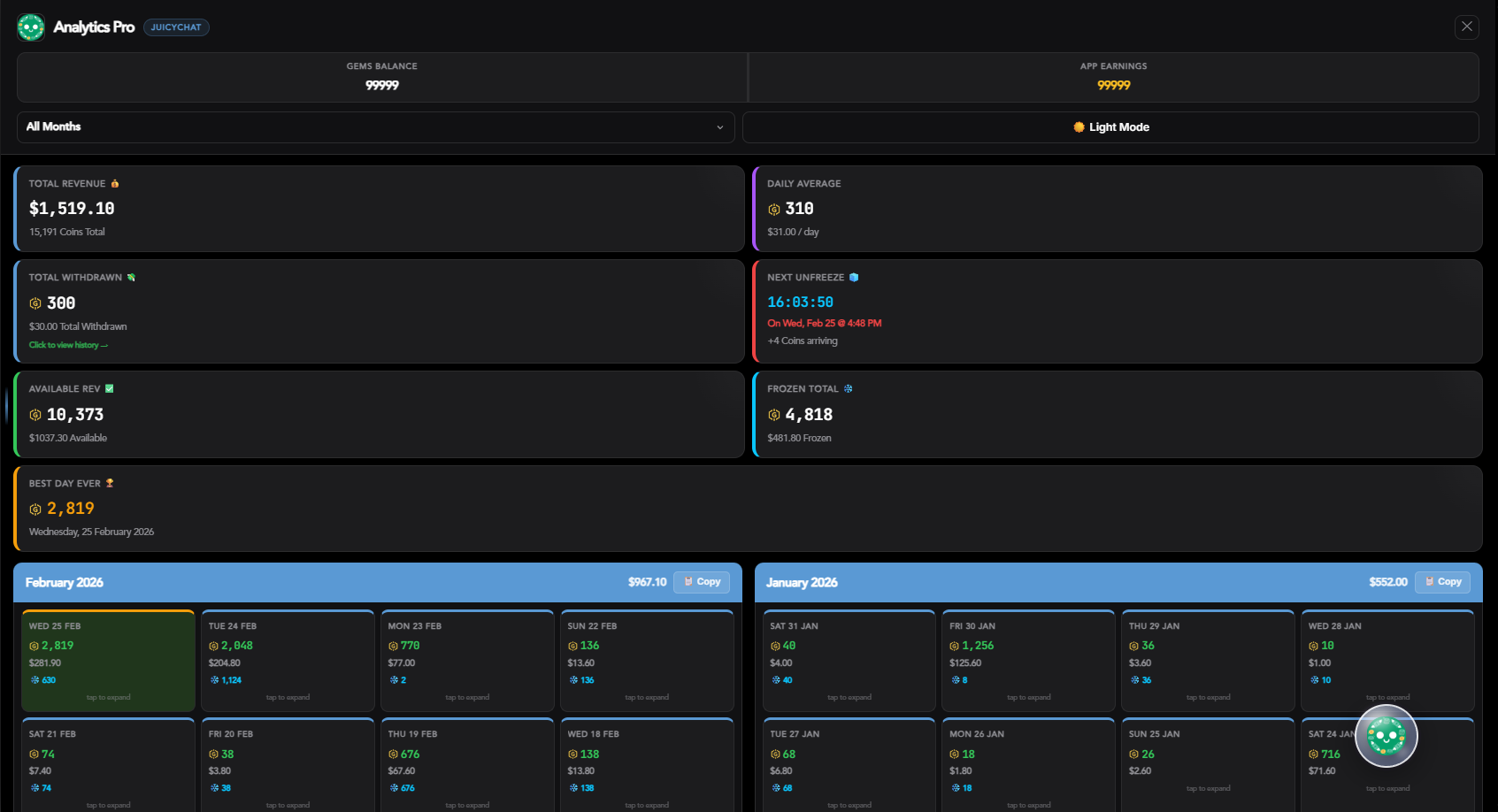
Dashboard
Full Dashboard Overview
The sidebar open showing all 8 stat cards — total revenue, frozen coins, withdrawal history, and countdown timer.
juicychat.ai/my-wallet
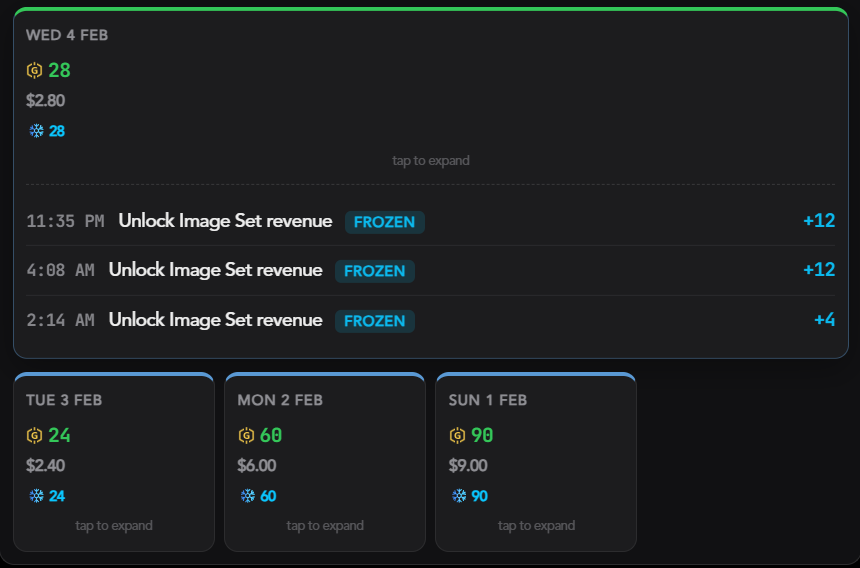
Day Card
Transaction Breakdown
Click any day card to expand and see every individual transaction — with frozen vs. revenue status tags.
juicychat.ai/my-wallet
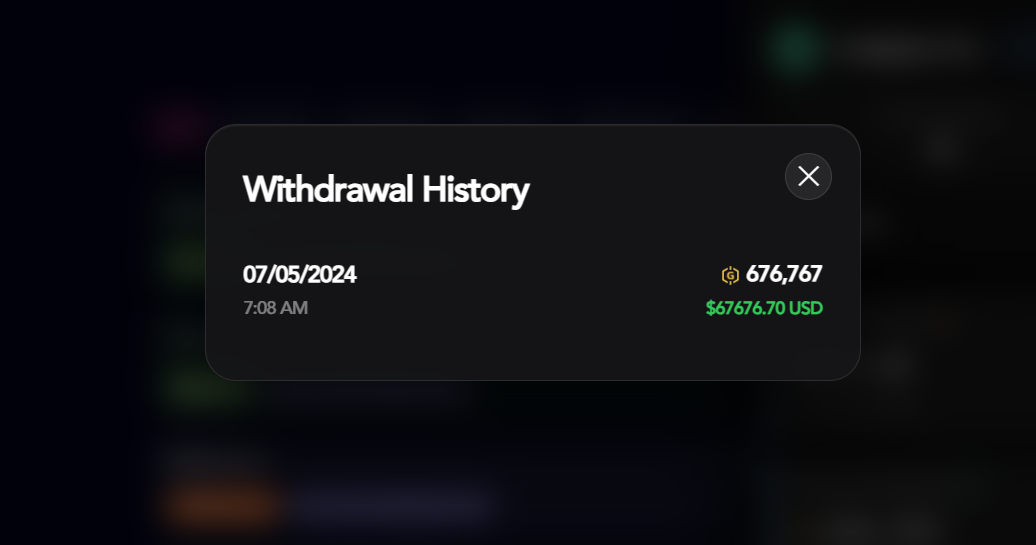
Withdrawal History
Withdrawal History Modal
Click the Withdrawn card to open a beautiful frosted glass modal with your full payout history.
juicychat.ai/my-wallet
Glass Orb
Liquid Glass Auto-Load Orb
Double-tap the floating orb to auto-scroll your entire history — it loads everything for you while you watch.
Features

Built for JuicyChat creators.

Every feature was designed around how you actually use your wallet page.

📊
8-Stat Live Dashboard
Total revenue, daily average, frozen coins, available balance, best day, next unfreeze countdown, withdrawn total, and this-month total — all updating every 5 seconds.
Auto-refresh
⏱️
Next Unfreeze Countdown
Live countdown timer to the exact moment your next frozen coins unlock — calculated from the original transaction timestamp, accounting for UTC offset automatically.
Live
❄️
Frozen vs. Available Split
Instantly see what's locked vs. spendable. Frozen transactions are highlighted in every day card and flagged with the exact thaw date.
📅
Month Filter + Day Cards
Filter by any month or switch to "Last 7 Days". Click any day card to expand a full transaction list with time, description, and status tags.
💸
Withdrawal History Modal
Click the Withdrawn card to open a frosted-glass modal with every payout — date, time, coin amount, and USD equivalent all in one place.
🔮
Liquid Glass Auto-Load Orb
A floating draggable orb appears when you open the dashboard. Double-tap it to auto-scroll your entire transaction history and load all data automatically.
Unique
↔️
Resizable Sidebar
Drag the left edge of the sidebar to resize it. At 680px+ it switches to a 4-column wide layout, giving you more data at a glance.
🌙
Dark & Light Mode
Full dark and light themes toggled with one click — your preference is persisted. Both themes are tuned specifically for the Analytics Pro UI.
🔐
Patreon Auth + JWT
Log in with your Patreon account in one click. Your session is secured with a JWT token and heartbeat-validated every 5 minutes to ensure your membership is active.
Secure
Installation

Up and running
in 60 seconds.

No Chrome Web Store needed. Load it directly as an unpacked extension.

01
Download the ZIP file
Click the download button and save AnalyticsPro.zip to your computer.
02
Extract the ZIP
Right-click → Extract All (Windows) or double-click (Mac). You'll get a folder with manifest.json inside.
03
Open Chrome Extensions
Navigate to chrome://extensions/ in your address bar.
04
Enable Developer Mode
Toggle Developer mode ON in the top-right corner of the extensions page.
05
Click "Load unpacked"
Select the extracted AnalyticsPro/ folder. The extension installs instantly.
06
Go to your JuicyChat Wallet
Navigate to juicychat.ai/my-wallet and log in with your Patreon account. The dashboard appears automatically.
Download Analytics Pro
Latest build — tested on Chrome, Brave, and Edge. Exclusive to Patreon members.
Requires active Patreon membership to unlock access
Chrome · Brave · Edge · Any Chromium browser
Download AnalyticsPro.zip Latest version · Unpack & load
After downloading, follow the 6 steps on the left.
Questions? Join on Patreon →
Android App
New

Same power.
Now in your pocket.

The full Analytics Pro experience wrapped in a native Android app — same dashboard, same auto-load orb, same Patreon auth. No browser required.

Chrome Extension (Desktop)
Android App — All Devices
Quick Start — 7 Steps
01
Download the APK
Tap Download APK on this page and save AnalyticsPro.apk to your Android device.
02
Allow Installation from Unknown Sources
Go to Settings → Security and enable Install unknown apps for your file manager or browser.
03
Install & Open Analytics Pro
Tap the downloaded APK and follow the install prompt. Then open the app — you'll see the lock screen.
04
Log In with Email + Key or Patreon
Enter your email and access key, or tap Continue with Patreon to authenticate instantly.
05
Log Into JuicyChat on the Wallet Page
The app will load juicychat.ai/my-wallet inside a WebView — log in with your JuicyChat account.
06
Dashboard Opens Automatically
After the page refreshes your Analytics Pro dashboard slides in automatically — no extra steps needed.
07
Double-Tap the Auto-Load Orb
Tap the floating 🔮 orb twice to trigger auto-scroll — it will load your entire transaction history automatically while you watch.
Analytics Pro · Android
v1.3 · Latest Release
Native Android app — runs JuicyChat in a secure WebView with the full dashboard injected. Works on Android 7.0+.
Requires active Patreon membership
Android 7.0+ · Any device · ARM & x86
Download AnalyticsPro.apk v1.3 · ~8MB · Android 7.0+
Before Installing
Enable Unknown Sources in your Android security settings, or when prompted during install. This is required for any sideloaded APK.
After installing, follow the 7 steps on the left.
Questions? Join on Patreon →
Changelog

Version History

Track what's new across both the Chrome extension and the Android app. Updates ship when they're ready — not on a schedule.

Chrome Extension
Latest: v2.5
v2.5 Latest Mar 2026
  • Fixed Available balance incorrectly subtracting withdrawals from other months when using month filter
  • Fixed Last Withdrawal card always showing the oldest withdrawal instead of the most recent
  • ~Available balance formula: month view now shows period revenue minus period frozen only; all-time withdrawals only deducted on "All Months" view
  • ~Refunds correctly add back to available balance and appear in withdrawal history modal with + sign
v2.4 Feb 2026
  • +Resizable sidebar — drag left edge to expand to 4-col layout
  • +Heartbeat session validation every 5 minutes
  • ~Improved frozen coin UTC offset calculation
v2.3 Dec 2025
  • +Withdrawal History modal with full payout log
  • +One-click copy summaries per month
  • ~Auto-load orb stability improvements
v2.0 Nov 2025
  • +Full dashboard rewrite with 8-stat layout
  • +Next Unfreeze live countdown timer
  • +Dark & Light mode toggle
Android App
Latest: v1.3
v1.3 Latest Mar 2026
  • Fixed Available balance showing 0 for all months except the one containing the withdrawal
  • Fixed Last Withdrawal card showing oldest payout instead of most recent
  • ~Available balance per-month now correctly shows that month's earned but unfrozen coins
  • ~Withdrawal history modal sorts newest-first and correctly shows refunds with + amounts
v1.2 Feb 2026
  • +Auto-load orb fully ported — double-tap to scroll history
  • +Patreon OAuth login via secure popup WebView
  • ~Fixed localStorage bridge on older Android WebView builds
v1.1 Jan 2026
  • +Dashboard auto-opens after JuicyChat login
  • +chrome.storage → localStorage bridge layer
  • Fixed JWT expiry loop causing repeated logouts
v1.0 Initial Dec 2025
  • +First Android APK release — WebView wrapper
  • +Email + key authentication
  • +Core dashboard injected into JuicyChat wallet
Stay updated — New versions are announced on Patreon first. Members always get early access.
Join Patreon for updates →
Access

Already a member?

Use your email + access key, or log in directly with Patreon.